Spatial advertising for physical venues

The ad & data platform for the physical world.

Advertising revenue that occupies zero square feet, and the first real picture of how your visitors move.

Measured, not estimatedNo app to downloadNo hardware, no constructionLive in days, not quartersRevenue out of thin airApproved by you before it runs Measured, not estimatedNo app to downloadNo hardware, no constructionLive in days, not quartersRevenue out of thin airApproved by you before it runs
Zone 01 / The gap

You sell estimated exposure. Advertisers buy measured engagement.

Venue media reports how many people probably walked past. Overrr reports which offers were delivered, how far away the visitor was standing, and whether they moved toward the store.

Traditional venue media
  • Estimated impressions
  • Modelled audience
  • Monthly PDF report
  • No path to purchase
Overrr
  • Delivered impressions, by zone
  • Observed dwell and movement
  • Live dashboard, always on
  • Offer opened, store visited
Zone 02 / What venues get

Two things your property has never had.

Everything else on this page is mechanism. This is the proposition: a revenue line that did not exist before, and a view of visitor behaviour that nothing else on the property can produce.

01 / Revenue

Revenue made out of thin air.

Advertising inventory that does not exist on your property today. It displaces nothing, competes with nothing, and takes no capital to create.

  • A new line item rather than a reallocation of an existing one
  • No capital expenditure, no build, no added headcount
  • Existing sponsorship and specialty leasing deals stay untouched
  • You are paid on delivery you can verify yourself
02 / Data

See what your property has never been able to see.

Every visitor who opens the experience leaves a record of where they went, how long they stayed and what they responded to. Not a panel, not a model, not a survey. Observed behaviour on your own floor.

  • Zone level movement, dwell time and flow between anchors
  • Return visit patterns and time of day demand
  • Offer response by tenant, by category, by location
  • Evidence you can take into leasing, merchandising and rent reviews
Zone 03 / How it works

A new revenue line. Nothing to build.

01

We instrument your venue.

GPS zone targeting maps your property into precise advertising zones: entrances, food courts, anchor corridors. No hardware. No construction. Live in days rather than quarters.

02

Advertisers reach visitors in the moment.

Tenants and brands deliver offers to visitors' phones based on exactly where they are standing. A coffee promotion at the entrance, a flash sale as they pass the store.

03

You get paid.

Overrr sells the advertising, operates the network, and returns a share of every dollar it produces to you.

Zone 04 / The model

Like percentage rent. For attention.

A base fee, plus a share of what your traffic produces. A structure your asset managers already understand, applied to an asset nobody has been billing for.

Your cost

Nothing to build, nothing to staff, nothing to maintain.

Your risk

No existing revenue line is touched or renegotiated.

Your upside

A share of every dollar the network earns on your property.

Zone 05 / The experience

Three journeys. One platform.

See what visitors experience, what venues control and what advertisers can measure. The same visit, from three sides.
Journey 01Visitor 01 / 06
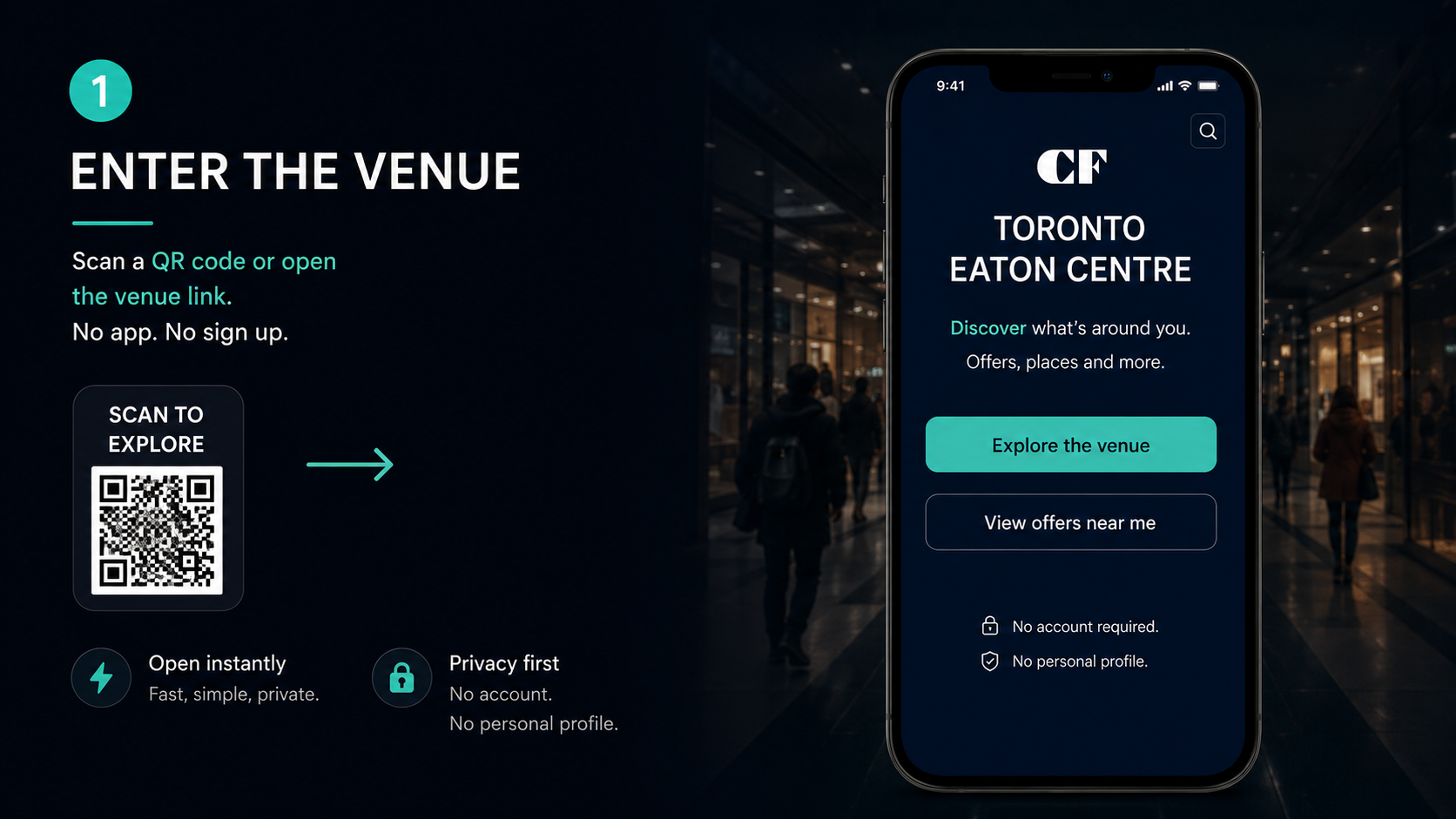
Overrr visitor app, step 1 of 6: a shopper enters the venue and scans a QR code, which opens the Overrr web app instantly in the browser with no download, no app install and no account or personal profile required.
Screenshot of the Overrr visitor web app at entry. A QR code scan opens a mobile screen welcoming the visitor to the venue. The interface confirms there is no app download, no sign-up and no personal profile; the session is anonymous and starts the moment the visitor arrives.
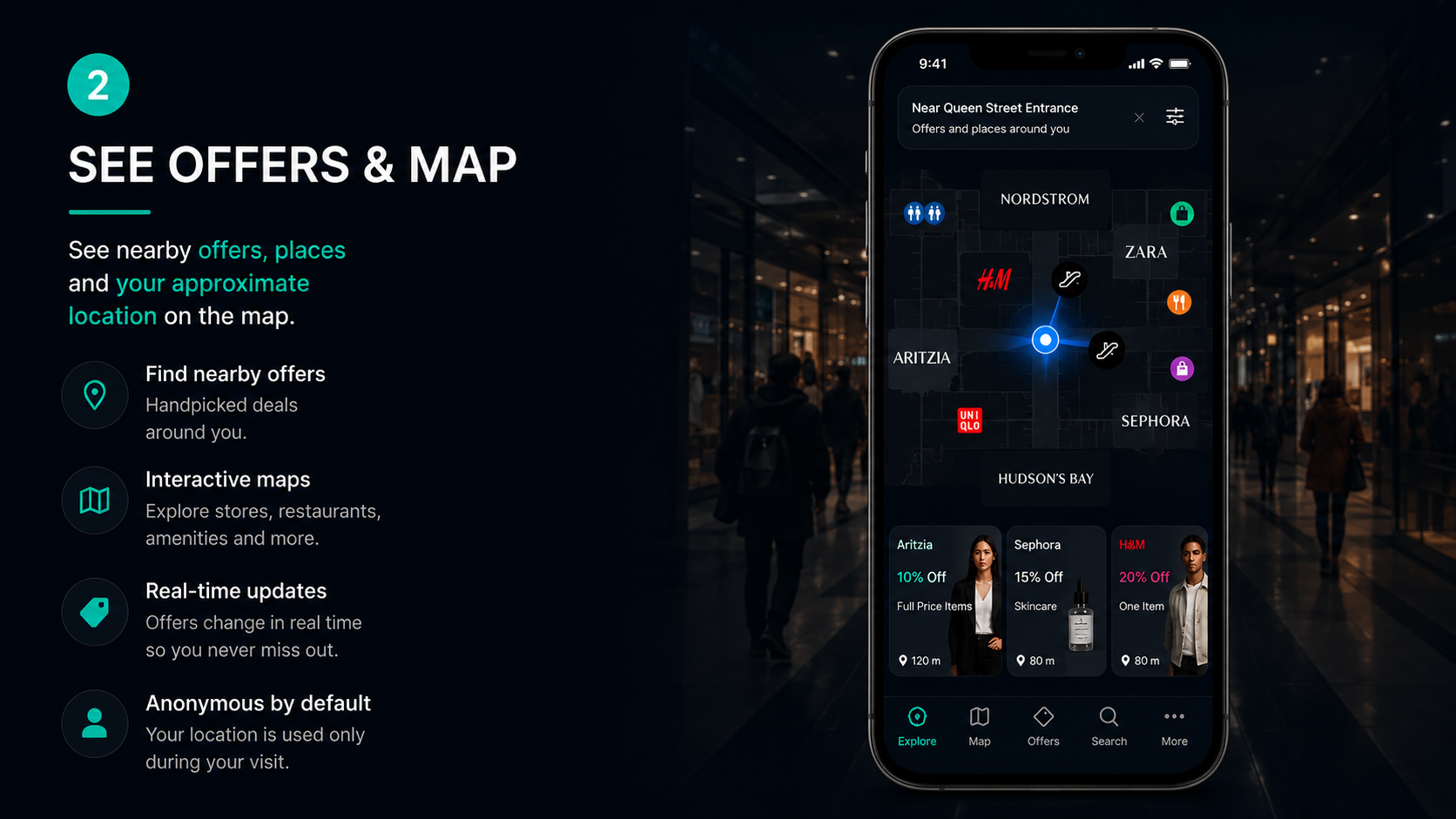
Overrr visitor app, step 2 of 6: the visitor sees an interactive indoor map of the venue showing their current zone alongside a list of nearby stores and live offers available around them.
Screenshot of the visitor offers-and-map view. An indoor venue map marks the visitor's current position and surrounding zone, with a scrollable list of nearby retailers and time-limited promotional offers ranked by proximity to where the visitor is standing.
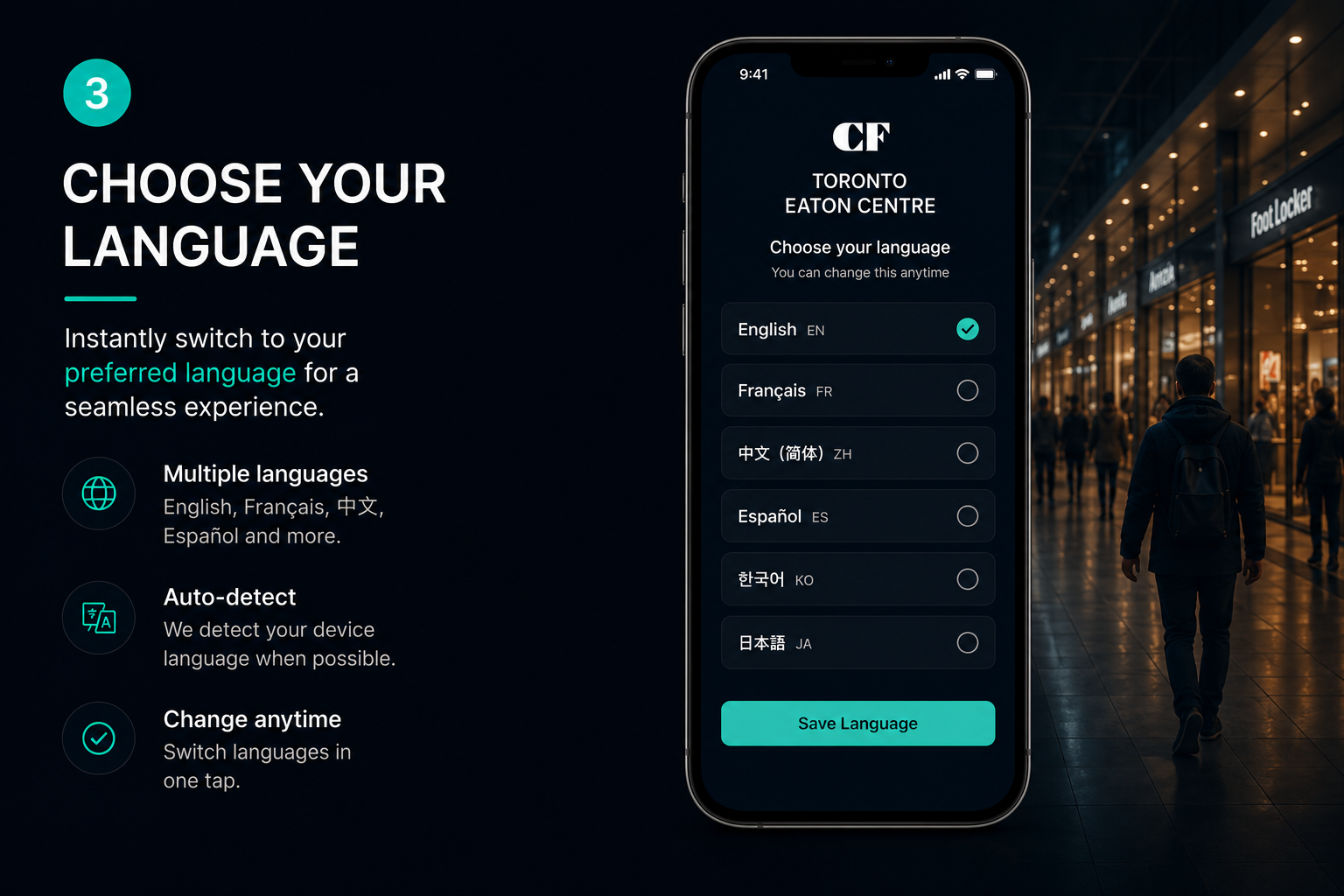
Overrr visitor app, step 3 of 6: a language selector lets the visitor switch the entire interface, including offers and store names, into their own language with a single tap.
Screenshot of the language selection screen. A list of languages is presented; choosing one instantly translates the whole visitor interface, including navigation, store listings and offer copy, so international visitors read the venue in their native language.
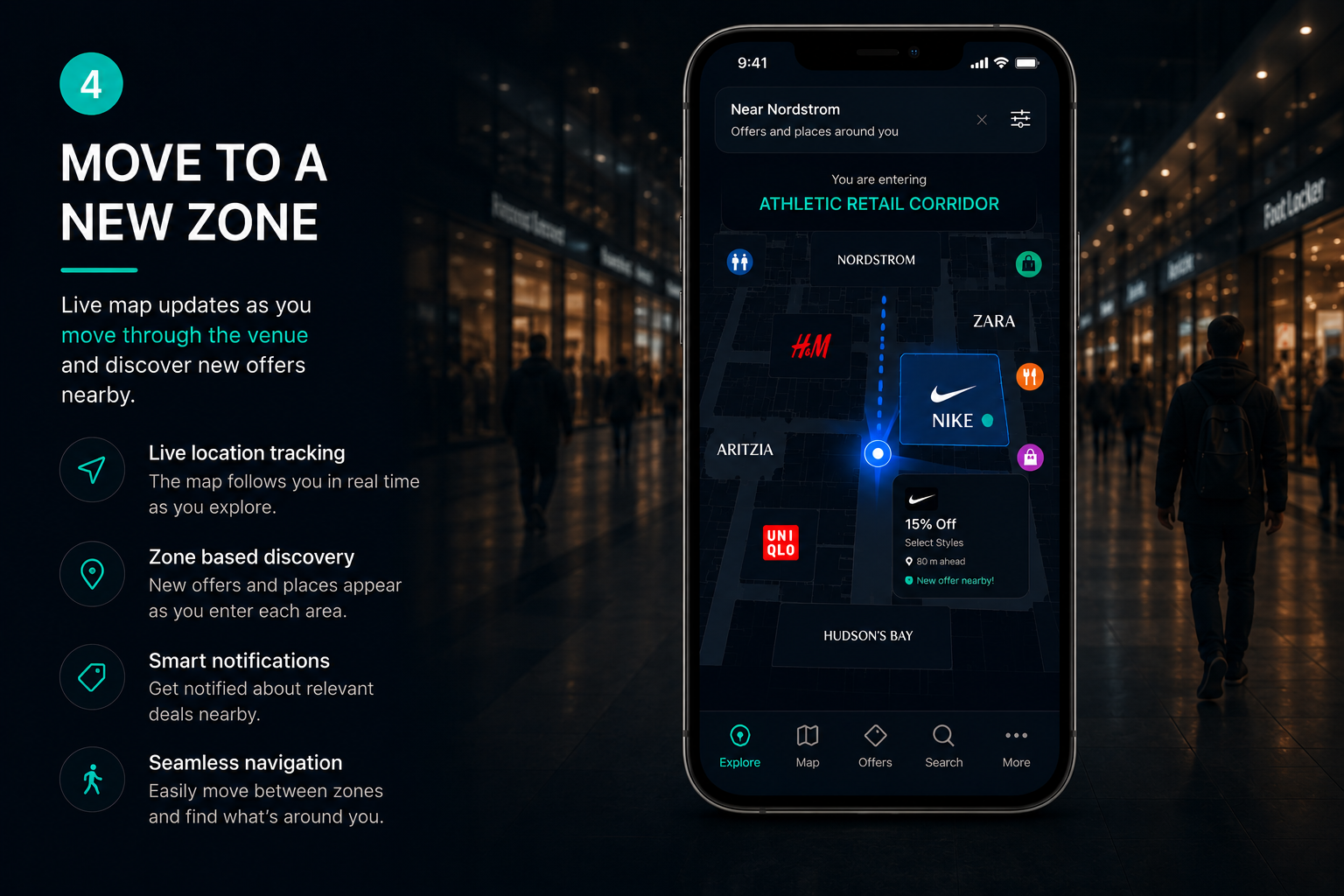
Overrr visitor app, step 4 of 6: as the visitor walks into a different zone of the venue, the map redraws and the offer inventory updates to match the new location.
Screenshot showing zone transition. The visitor has moved to a new part of the property; the indoor map re-centres on the new zone and the offer feed refreshes with a different set of nearby retailers and promotions relevant to that location.
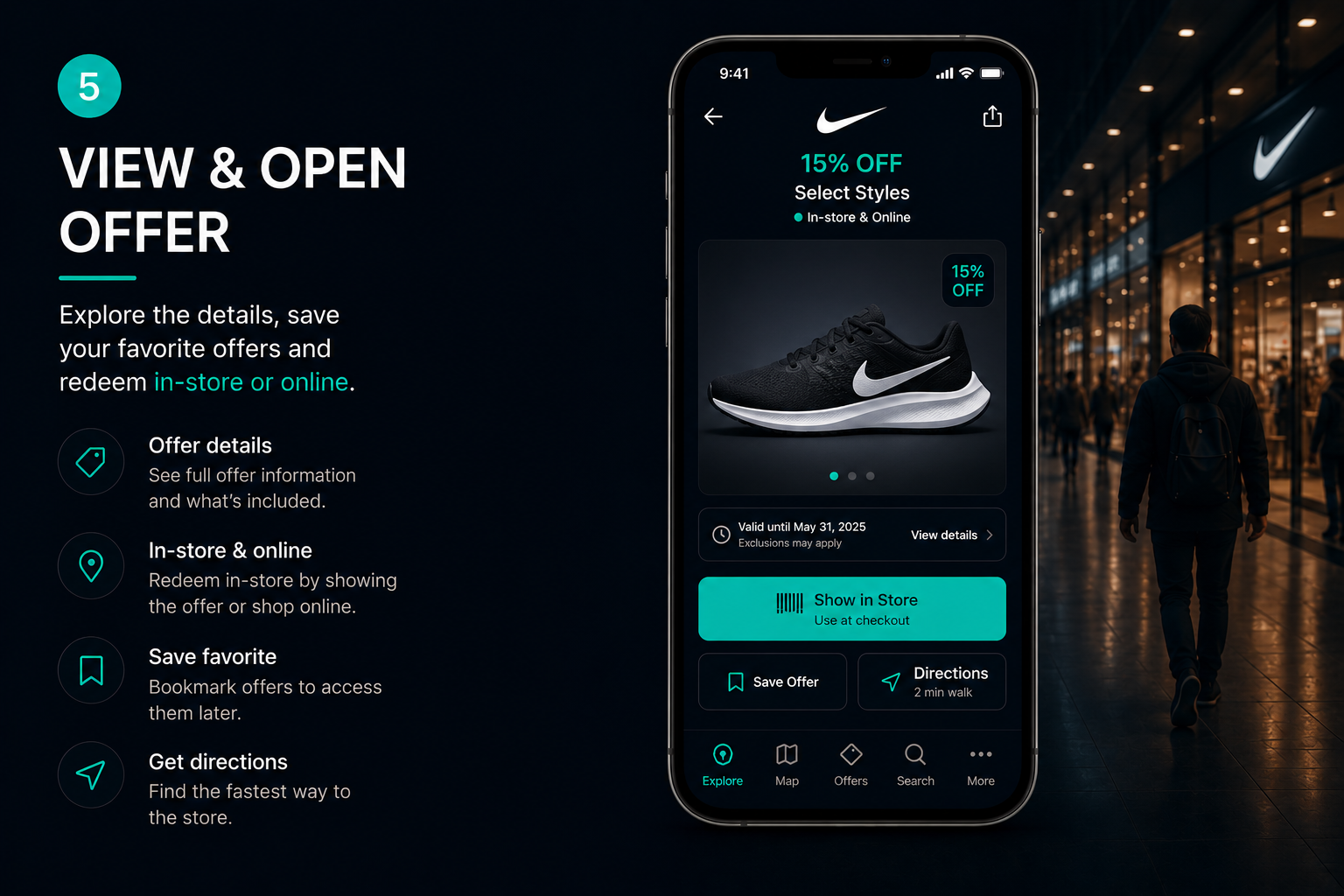
Overrr visitor app, step 5 of 6: the visitor taps an offer to view and open it in full, showing the discount detail and redemption instructions. This is the first commercial action, chosen by the visitor.
Screenshot of an opened offer detail. The card shows the retailer, the promotion value, terms and how to redeem it in store. The visitor opted in by tapping; nothing was pushed or interruptive.
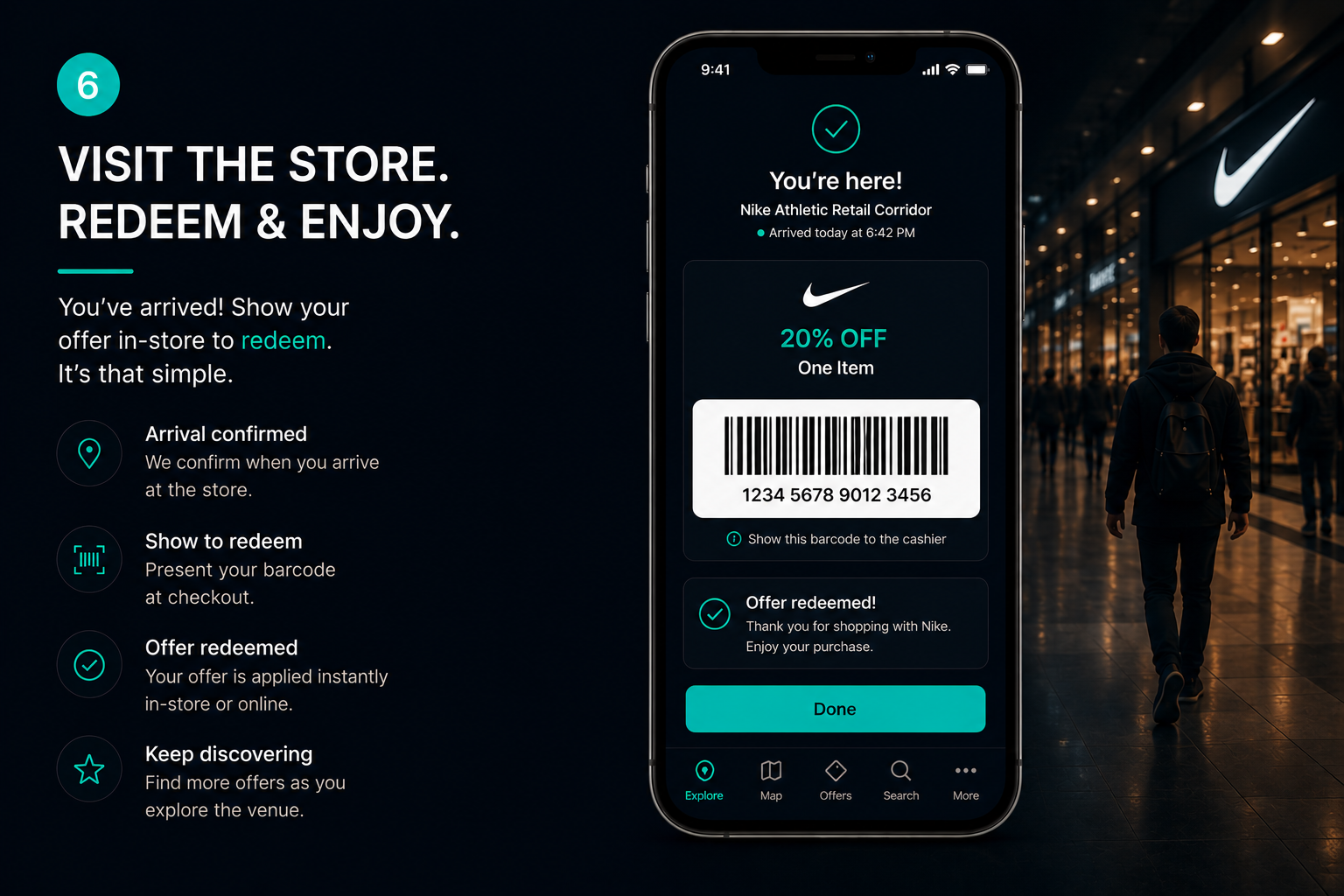
Overrr visitor app, step 6 of 6: arrival at the store is confirmed and the offer is ready to redeem at the till, closing the loop from impression to in-store visit.
Screenshot of the redemption state. The app confirms the visitor arrived at the retailer and displays the offer ready for staff to redeem at checkout, completing the attribution chain from offer view to physical store visit.
Enlarge
Step 01

Enter the venue

A QR code opens it. No app, no account, no personal profile.

Step 02

See offers and map

Where she is standing, what is nearby, and what is on offer.

Step 03

Choose your language

The whole interface, in her language, in one tap.

Step 04

Move to a new zone

New zone, new inventory. The map redraws as she walks.

Step 05

Open the offer

The first commercial action she takes, and she chose it.

Step 06

Visit the store

Arrival confirmed. The offer is ready at the till.
Journey 02Venue 01 / 05
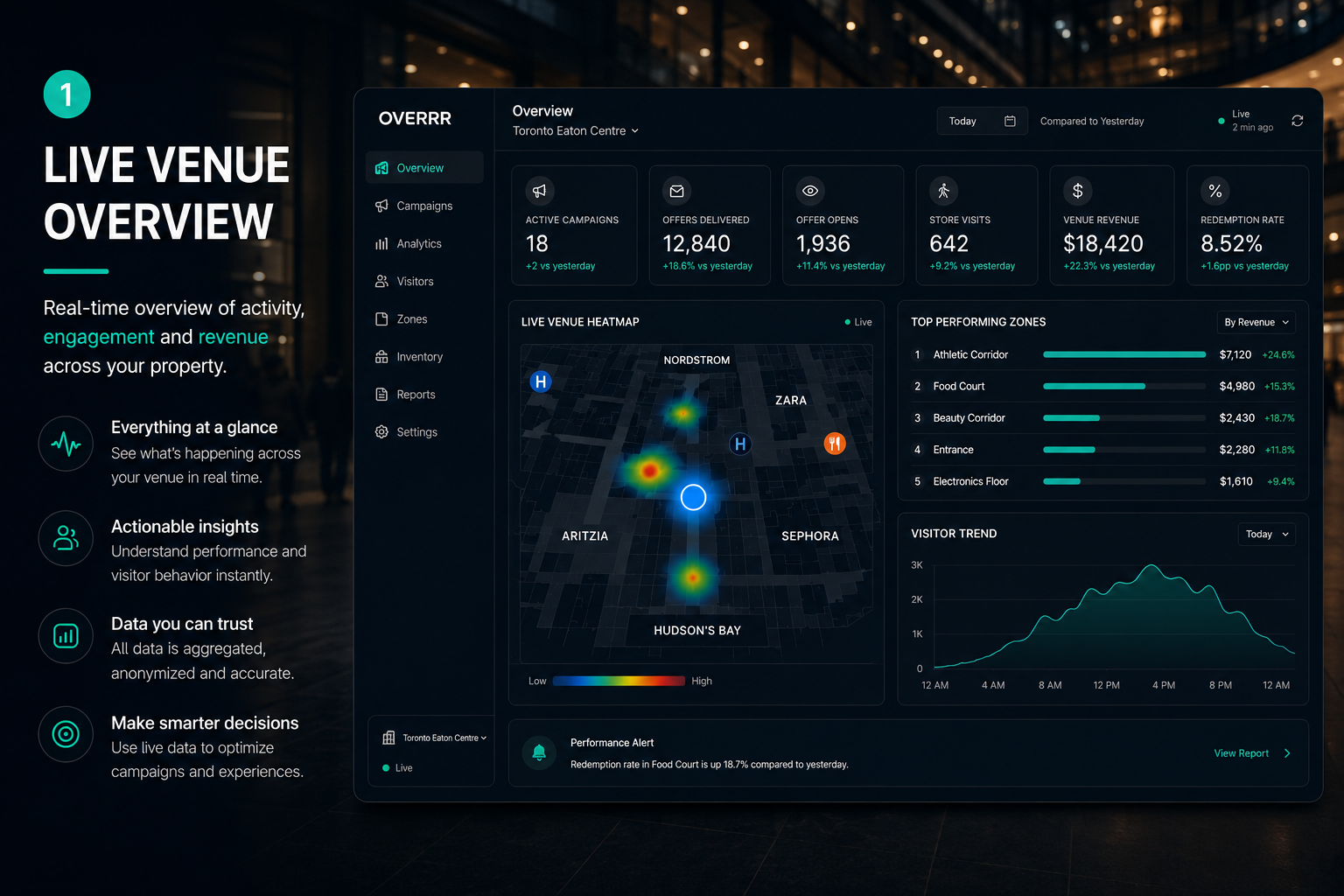
Overrr venue dashboard, step 1 of 5: a live overview of the whole property showing real-time visitor traffic and advertising revenue across every zone.
Screenshot of the venue operator dashboard home. Headline tiles show live visitor counts, active sessions and advertising revenue to date, with a property-wide map summarising activity across all zones in real time.
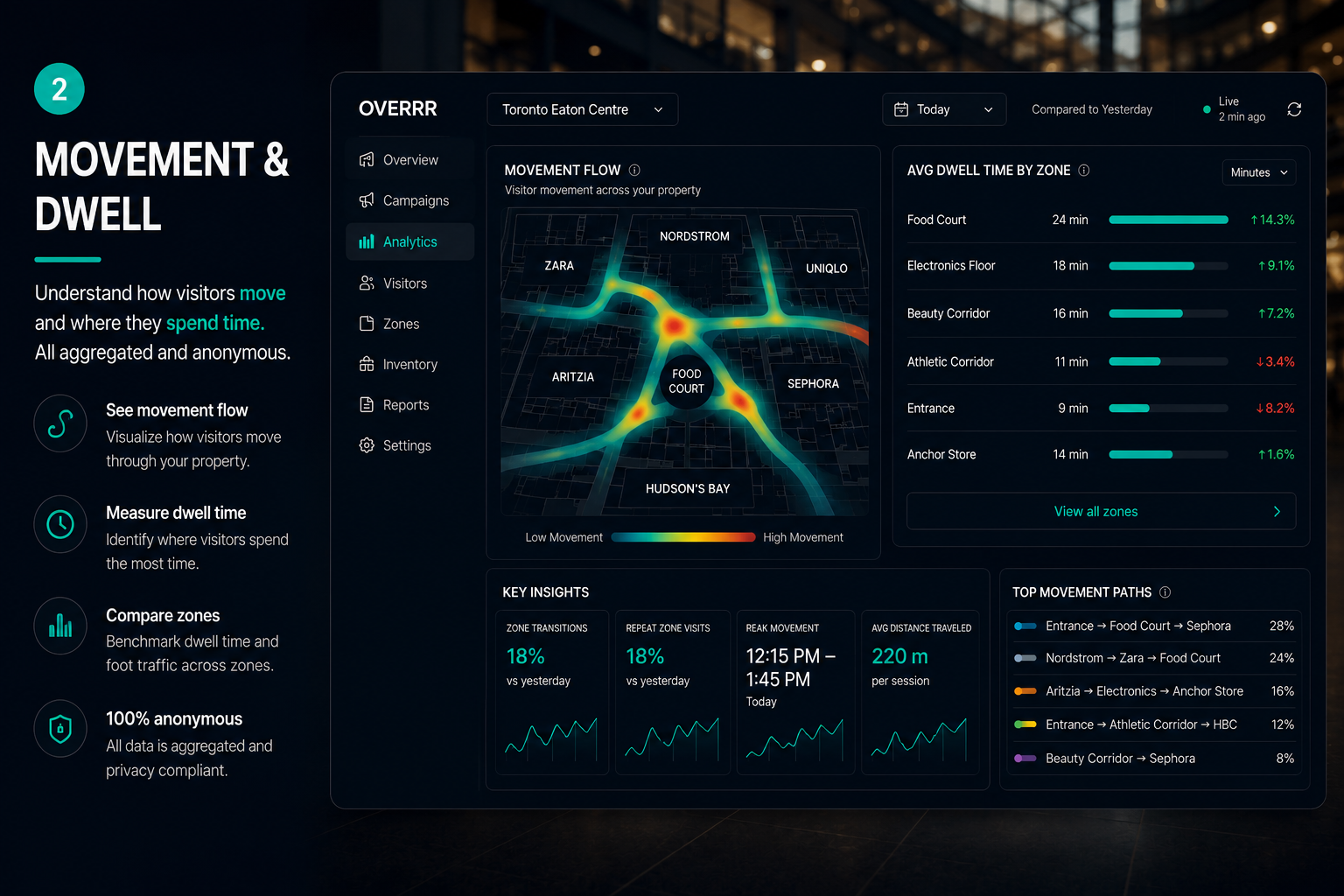
Overrr venue dashboard, step 2 of 5: movement and dwell analytics visualising how visitors flow through the property and where they linger, aggregated and never tied to an individual.
Screenshot of the movement and dwell view. A heat-mapped floor plan and flow lines show circulation paths, entry points, bottlenecks and average dwell time per zone. All figures are aggregated cohort data with no individual identification or personal profiles.
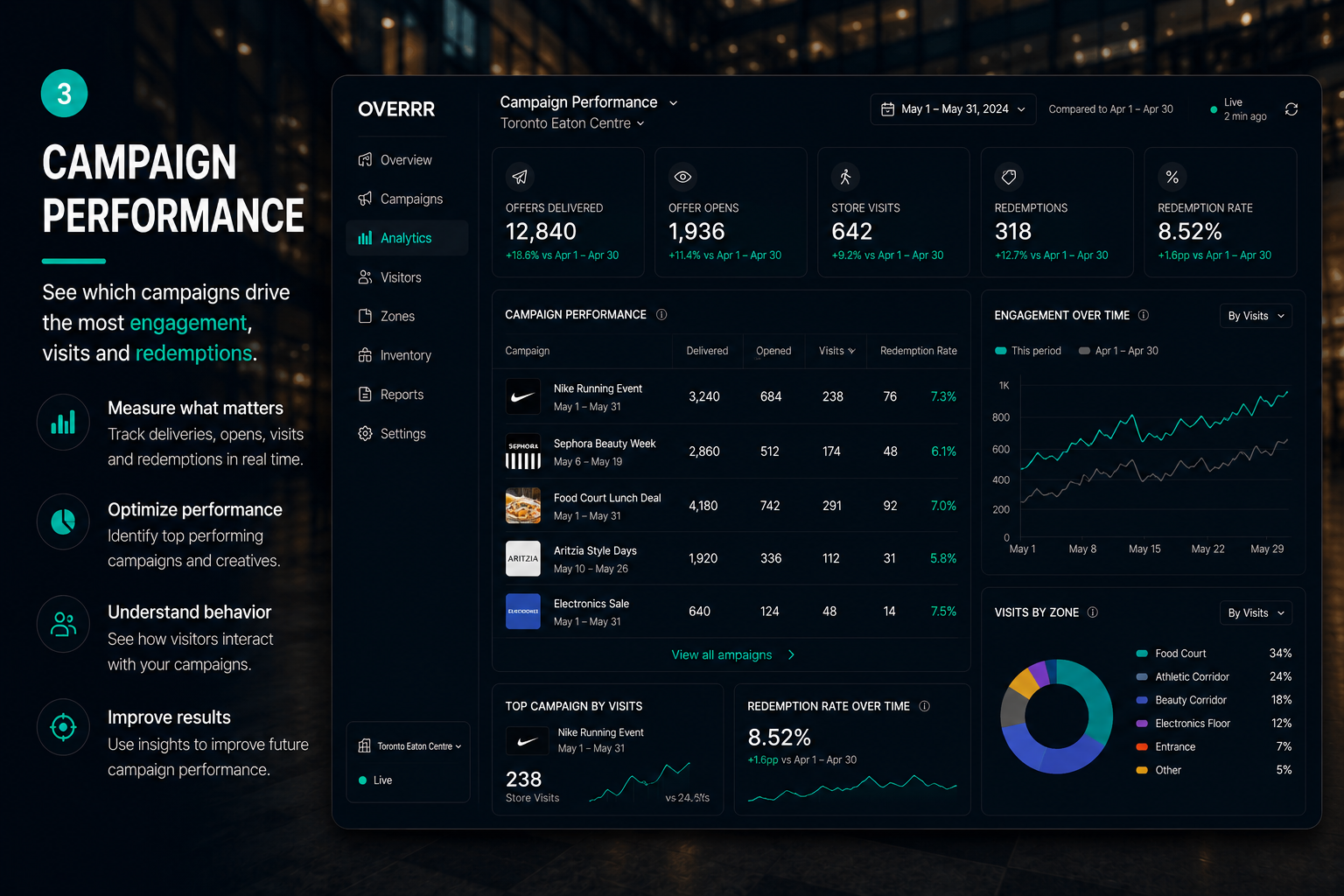
Overrr venue dashboard, step 3 of 5: campaign performance broken down by zone and by hour, showing which advertising campaigns are working inside the venue.
Screenshot of campaign performance reporting. Charts and tables rank active campaigns by impressions, offer opens and redemptions, sliced by venue zone and by hour of day so operators can see exactly when and where advertising performs.
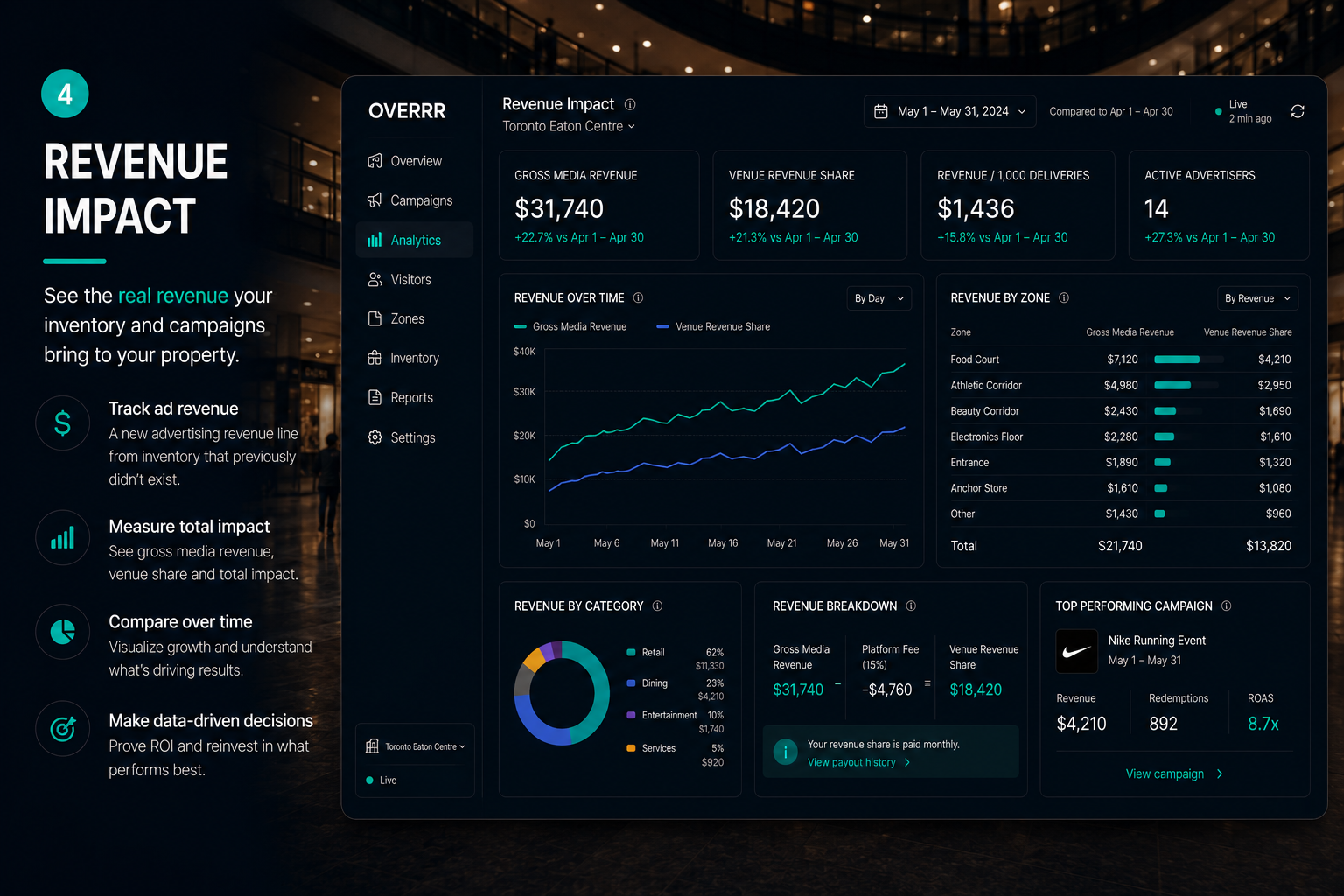
Overrr venue dashboard, step 4 of 5: revenue impact reporting showing the new advertising revenue line generated by the property without displacing existing income.
Screenshot of the revenue impact view. Trend charts show advertising revenue earned per period alongside contribution by zone and by advertiser, presenting the new income line the property did not have before Overrr.
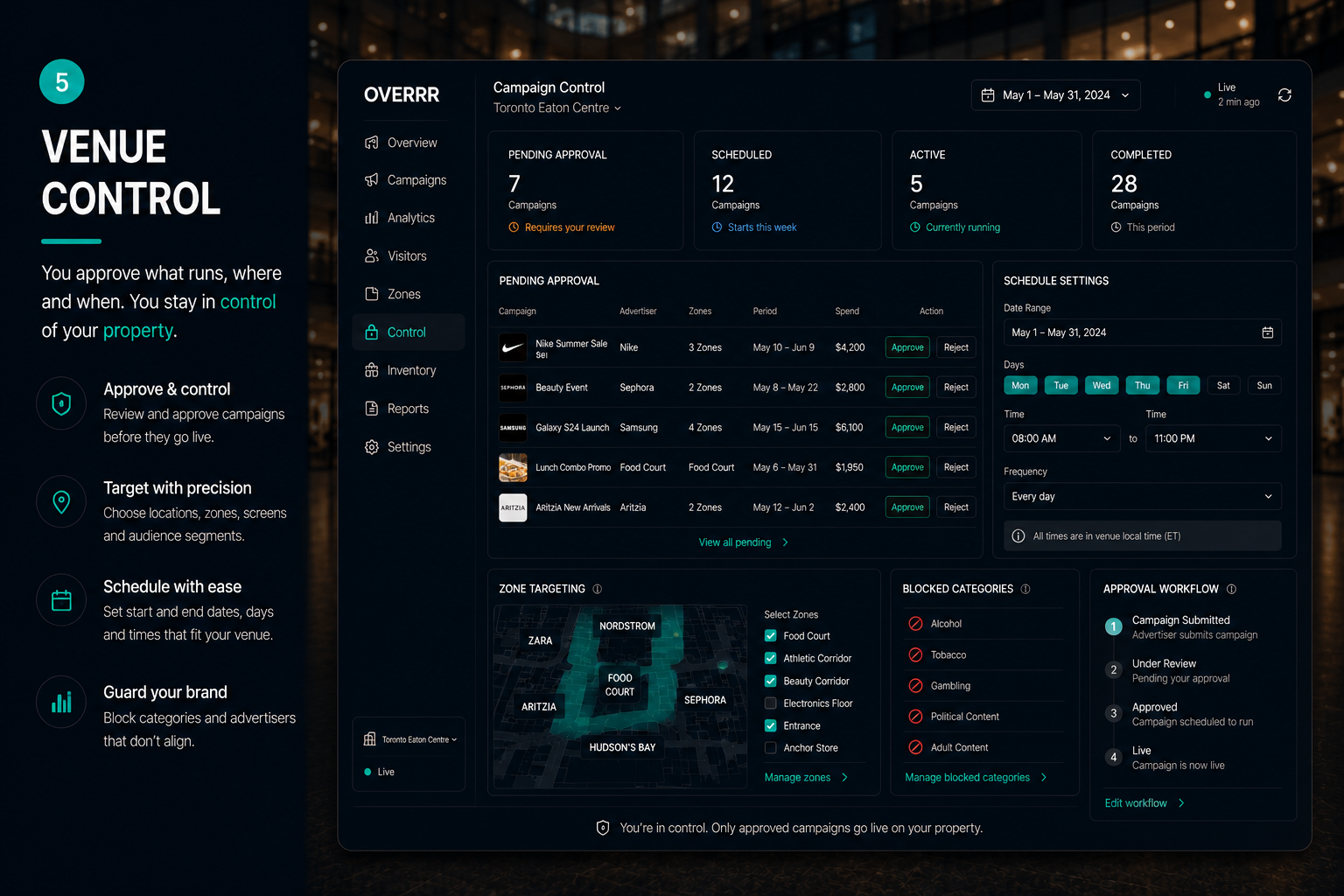
Overrr venue dashboard, step 5 of 5: venue control settings where the operator approves advertisers, creatives and zones before anything runs on the property.
Screenshot of venue controls. Approval queues, category blocklists and zone-level permissions let the operator vet every advertiser and creative. Nothing is served on the property without explicit venue approval.
Enlarge
Step 01

Live venue overview

Live traffic, live revenue, across the whole property.

Step 02

Movement and dwell

How visitors move and where they linger. Aggregated, never individual.

Step 03

Campaign performance

Which campaigns are working, by zone and by hour.

Step 04

Revenue impact

The line item that did not exist last quarter.

Step 05

Venue control

Nothing runs on your property without your approval.
Journey 03Advertiser 01 / 05
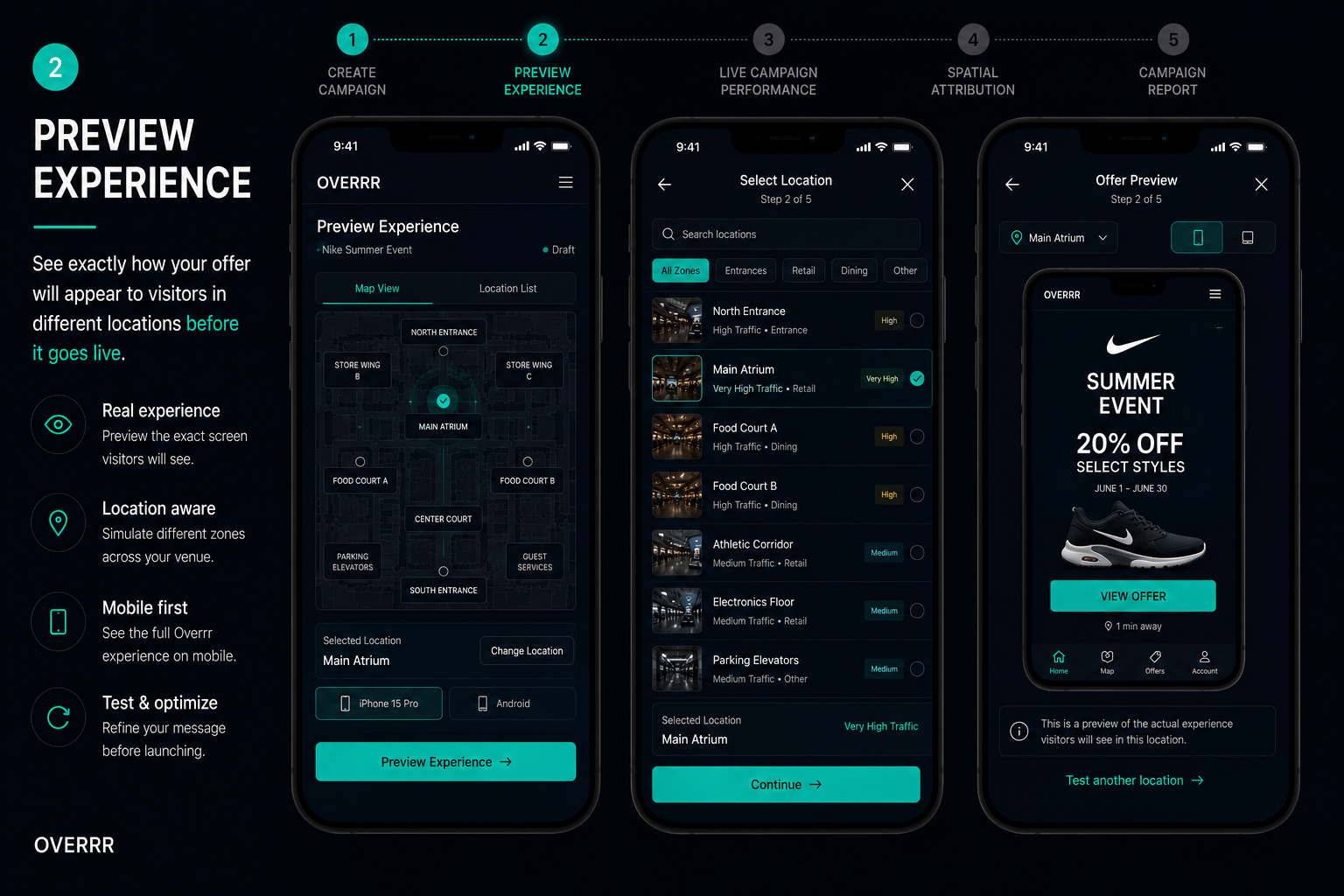
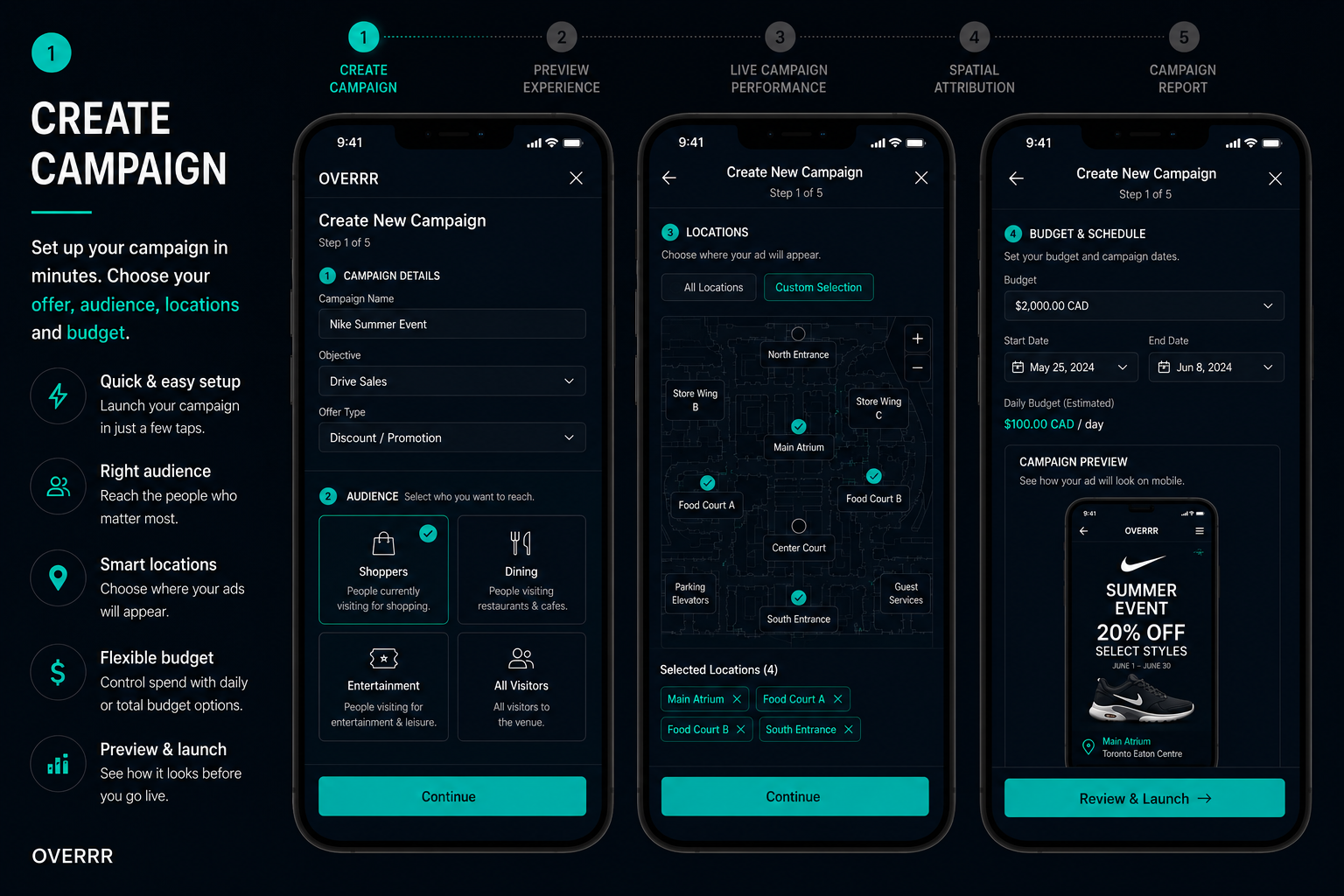
Overrr advertiser console, step 1 of 5: campaign creation, where an advertiser sets the objective, budget, target venue zones and schedule for a spatial campaign.
Screenshot of the campaign builder. Form fields cover campaign name, objective, budget and flight dates, with zone-level targeting inside the venue and audience timing rules for when the offer should appear.
Overrr advertiser console, step 2 of 5: a preview of exactly how the offer will appear to a visitor on their phone inside the venue before the campaign goes live.
Screenshot of the creative preview. A phone mock renders the offer card as a visitor will see it in the venue app, letting the advertiser check copy, imagery and the redemption call to action before launch.
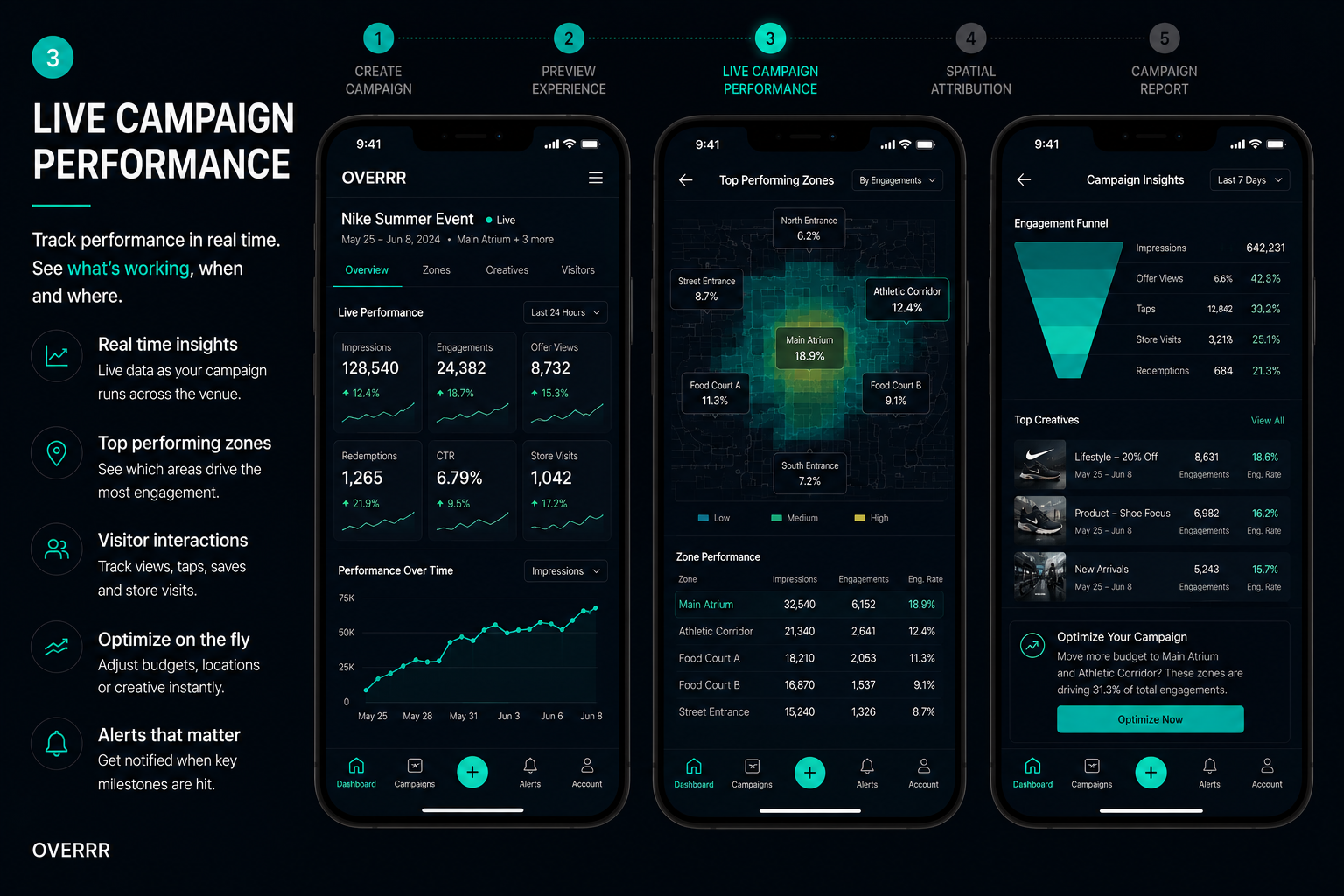
Overrr advertiser console, step 3 of 5: live campaign performance showing impressions, offer opens and redemptions updating in real time while the campaign runs.
Screenshot of live campaign metrics. Real-time counters and time-series charts track impressions, engagement rate, offer opens and redemptions, with pacing against budget while the campaign is in flight.
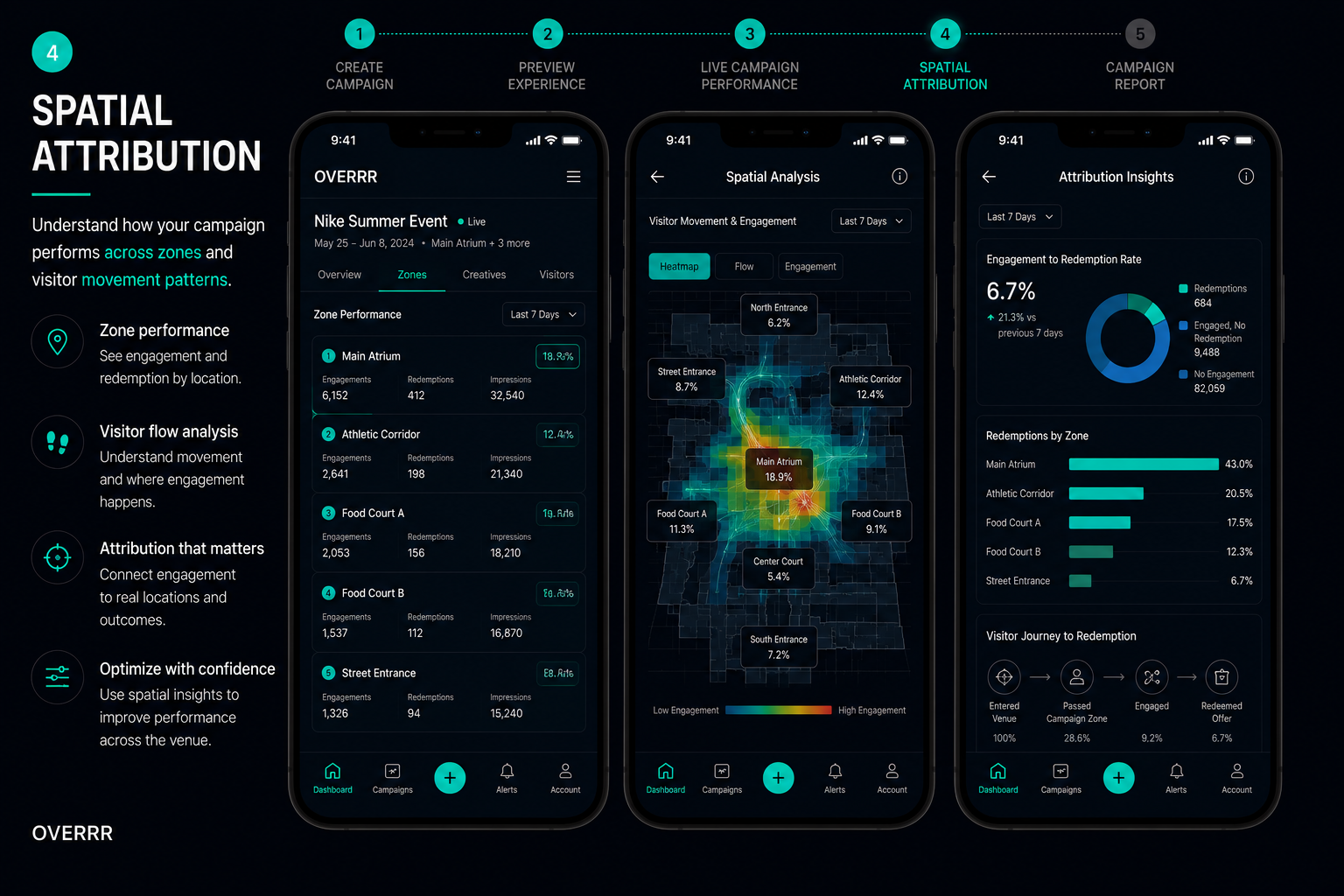
Overrr advertiser console, step 4 of 5: spatial attribution linking each ad impression to real movement inside the venue and to store arrival.
Screenshot of the spatial attribution view. A venue map with flow overlays connects where an offer was served to the visitor's subsequent path and confirmed arrival at the advertiser's store, quantifying physical-world attribution.
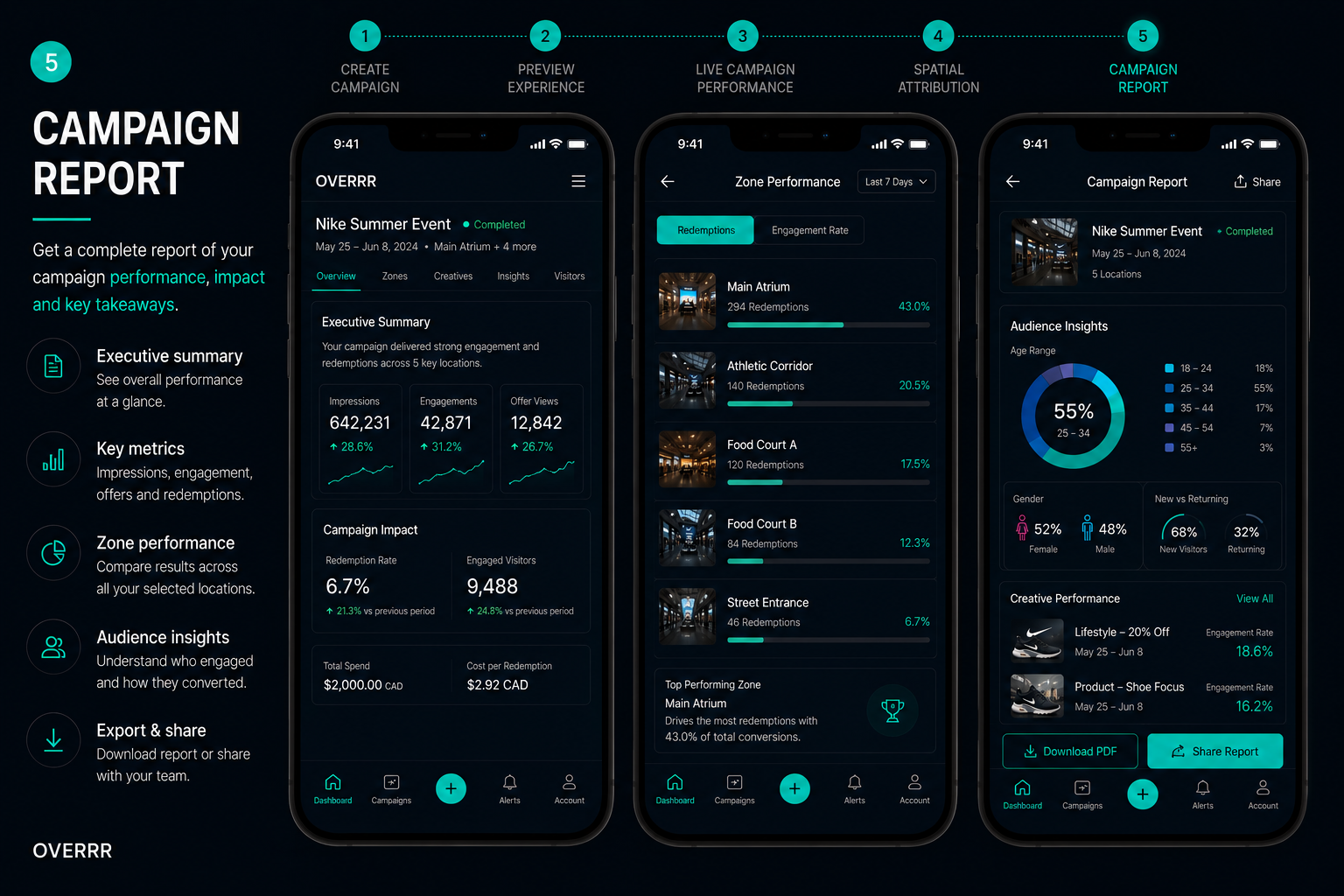
Overrr advertiser console, step 5 of 5: the exported campaign report summarising reach, engagement, footfall driven and cost per store visit.
Screenshot of the end-of-campaign report. A shareable summary covers total reach, offer opens, redemptions, incremental store visits attributed to the campaign and cost per visit, ready to export for the advertiser's own reporting.
Enlarge
Step 01

Create campaign

The tenant builds it. Zones, schedule, budget.

Step 02

Preview experience

The exact screen a visitor will see, before it goes live.

Step 03

Live campaign performance

Delivery and engagement while the campaign runs.

Step 04

Spatial attribution

Which zones produced the walk to the door.

Step 05

Campaign report

Cost per person who physically arrived.

Zone 06 / Reach

Your property speaks every language that walks in.

Nobody has to translate anything. Every visitor moves through your property, finds what they need and reads every offer in the language they already speak.

And can ask out loud, in any of them
As writtenEnglish
Level 2 · 80 m ahead
Vela Athletics
30% off all full-price footwear
Today only · in store · ends 6:00 PM
As delivered中文
2 层 · 前方 80 米
Vela Athletics
正价鞋履 7 折
仅限今日 · 门店专享 · 下午 6:00 结束
English中文العربيةFrançaisEspañol한국어DeutschPortuguêsहिन्दीTagalogand more
Zone 07 / Control

Your venue. Your brand. Your rules.

Overrr runs underneath your brand, never over it. Nothing reaches a visitor without passing through you first.

No app to download. It opens in the browser.

A QR code opens a venue-branded web experience in seconds. No install, no app store dependency, no adoption campaign to run.

Your branding, end to end.

Visitors see your venue, on your domain. Overrr is infrastructure rather than another logo on your property.

Every advertiser approved by you.

Full approval workflow. Category exclusions, tenant protections and creative review before anything goes live.

Nothing is locked in.

The pilot runs on your terms. If it is not working, it ends, and nothing about your property has changed.

Zone 08 / Reporting

Everything delivered is everything reported.

Impressions, engagements, redemptions and store visits, broken out by zone and by hour, for you and for every advertiser on your property.

Advertiser portal
Advertiser dashboard showing impressions, engagements, redemptions, store visits, performance over time and a live zone map
Impressions0▲ 18.6%
Engagements0▲ 24.3%
Redemptions0▲ 27.8%
Store visits0▲ 19.4%
Zone 09 / Intent

You reach the buyer steps from the checkout.

Most media competes for intent long before it exists, reaching people at home who are deciding nothing. Your property is the one place where the visitor has already travelled, already committed the afternoon, and is standing within sight of the shelf. Until now it was also the only place with no way to act on that.

They are already holding the screen. Overrr is the layer that turns it into venue-owned inventory, starting today on the phone in their hand and built for whatever screens come next.

Furthest from purchase Feet away
Zone 10 / Start

Start with one property.

Ninety days from first zone to first revenue report. No hardware, no construction, and no engineering time from your team. We operate all of it.

Week one

Your property is mapped.

We define the advertising zones with your operations team. Entrances, food courts, anchor corridors. Nothing is installed and nothing is built.

Weeks two to four

The first campaigns go live.

Tenants and brands submit. You approve every advertiser, every creative and every zone before anything reaches a visitor.

Day ninety

You get the numbers.

A full report on delivery, engagement, store visits and revenue attributed to your property. You decide what happens next.

Get in touch

Ready to turn foot traffic into revenue?

Tell us about your venue and we'll reply within one business day.